Community payouts on Whop
Reward the people who grow your business
Turn clips, calls, milestones, and sales into payouts—without spreadsheets or manual Whop transfers. Set your rules once; we route funds every time revenue hits.
How it works
From one payment to everyone who earned it
When a member pays—like a $20 subscription—you don't split spreadsheets. Your rules send the right slice to ops, creators, and community members automatically.
The live view on the right shows real allocation logic. Numbers below are a transparent preview (same fee model as your dashboard).
Member pays
$20.00
Ready to split (est.)
~$18.93
After Whop checkout fees
You define
Who gets what
Ops, members, buckets—your rules
In the animation: $8.33 to operations and five × $2.00 ($10 to Whop users)—before those small transfer fees.
$1 / $35 onward (after prepaid quota) is measured on Whop user payouts only—here $10, not the $8.33 operations leg and not the full $20 gross. At ~$10 of member-ward volume per similar payment, you typically add another $1 block about every 3rd–4th checkout once chargeable onward applies (same idea on manual sends—calculator).
Figures are illustrative; Whop settles the exact amounts.
This sketch: only $10 to members counts toward that meter—not $8.33 ops. ~every 3rd–4th similar run → another $1 after quota.
Fund & verify
Send money through Whop with pricing you can explain
Fund one-off or bulk sends with credit card or Whop Balance—the same paths as your dashboard. No extra “deposit and wait” workflow.
One-time verify
$5
Per business admin user, per company
Quota credit
$100
Shared pool per business
Who verifies
Each admin who sends
Must verify before paying out
After prepaid quota is used: $1 per $35 of onward send—no retainers, no opaque tiers.
Quota eats onward volume first; every business admin who verifies adds another $100 to the same company pool. Matches production billing.
In-app checkout
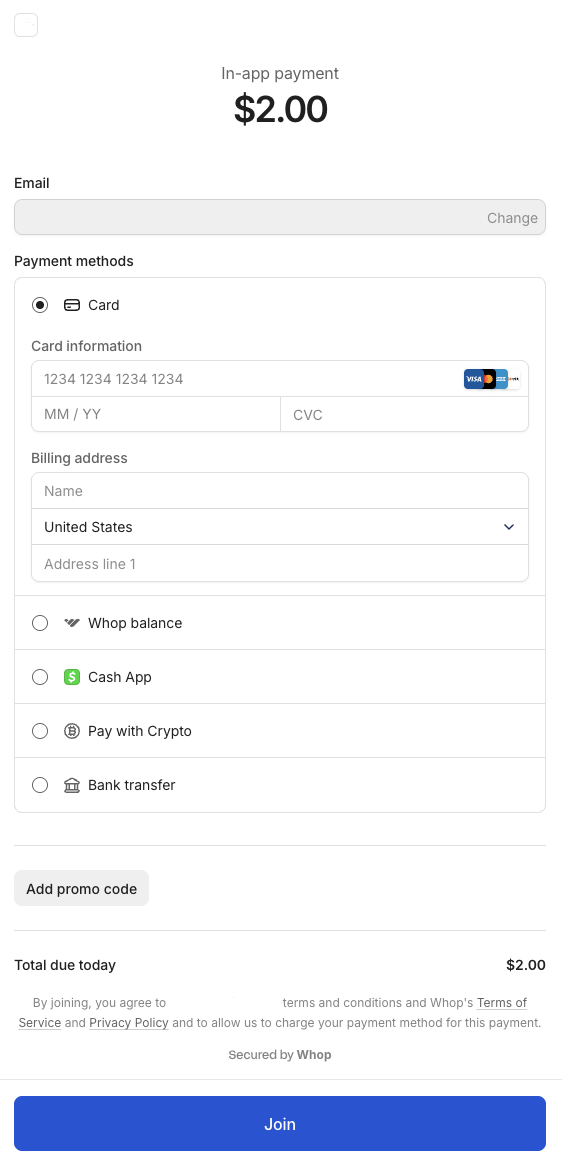
One-off Distribution
MANUAL PAYManual sends
One checkout, many recipients
Bonus rounds, make-goods, and spot rewards—fund with card or Whop Balance, pick who gets what, and we handle the split. Same fee preview as automated flows.
Fund with
Card / Balance
Split
1 → many
Fees
Shown up front
Automate incentives
Pay for outcomes, not admin time
Rules fire when your data says they should—clips, calls, usage, or leaderboards—so you scale rewards without another ops hire.
Social growth
Reward clips and reposts that actually move the needle—per view band or milestone.
Call performance
Tie payouts to dials, connects, or talk time so reps see the link to their check.
Asset rewards
When others use their templates, training, or assets, contributors earn automatically.
Pool splits
Drop a pool; we allocate by activity or rank—no proportional math in Sheets.
Integrations
Push signals, get payouts
POST views, call logs, or custom scores—rules recalc in near real time so members aren't waiting on a weekly CSV.
Fee preview
See what lands in wallets— before you charge
Move the slider to match your intended checkout; we show fee-first, then onward, then modeled Whop legs.
Whop checkout fees (if any) apply to the full gross checkout. Outbound ~3% is modeled on each post-checkout transfer leg (MultiUser app fee to platform + onward to recipients)—aligned with webhooks, not final settlement timing.
Forward + gross platform transfer after quota ($1 net per $35 onward + Whop send). Some totals snap to the nearest valid split.
Estimated breakdown
Checkout line matches the slider. Processing fees apply to the full gross; then MultiUser app fee and onward pool; outbound ~3% is summed per transfer leg (platform + recipients).
Forward + gross platform transfer (nominal app fee + Whop send)
$1 / $35 net to MultiUser (after quota). Card total includes a few cents per $1 of app fee so Whop can transfer that slice (+$0.84 here).
Before ~3% outbound
App-fee leg + onward pool (post-checkout)
Net to recipients
After modeled fees1–832 Whop recipients from this net if you allocate down to whole-dollar slots—or fewer people at larger shares. Add anyone on Whop—your community or not—and set a different amount for every line.
In production
Built for communities that ship
Same team behind creator payout tooling—shipping on Whop, not a slide deck.
Operator
CONTENT REWARDS AI
Studio
EXTENSIBLE CONTENT
Next step
Stop reconciling payouts by hand
Put rules on autopilot, fund exceptions in one checkout, and let members see rewards land where they already get paid.